
Compared to vacuum cleaners such as upright and canister, robot vacuum cleaners take up very little space. It is more convenient to store it anywhere, so it has become a good cleaning helper for most households. But you may find that the Roomba side brush suddenly does not rotate when cleaning, which is a problem that Roomba users often face during use. So what is the reason for this problem? How should I solve it?
Basic Troubleshooting and Cleaning
Start with a basic inspection of the Roomba to see if there is hair or debris tangling in the side brush. If so, it will prevent the brush from spinning. This is more likely to happen especially if you have pets at home. But it's a simple problem that just requires you to do some cleaning. You can use scissors or a small screwdriver as your helper to remove the tangles from the side brush and the brush will spin again.
If you find that the side brush is worn or damaged, you need to replace it in time. The replacement process is also very simple. In order to ensure its best performance, you need to buy the model that fits it. Finally, according to how often you use the Roomba, replace the side brush every 6-12 months.
Замена Боковой щетки на iRobot Roomba
Advanced Diagnostics: Disassembling the Drive Train
If the side brushes are operating roughly, erratically, or not at all you will need to partially disassemble the Roomba to check the drive train. You will need to do this to replace the motor as well. You may find it less challenging to just obtain a replacement drive module, especially if the motor seems to be the part with the problem rather than the gears. You will still have to disassemble your Roomba, though, so keep going to get there.
See above for side brush removal steps, then continue the procedure here:
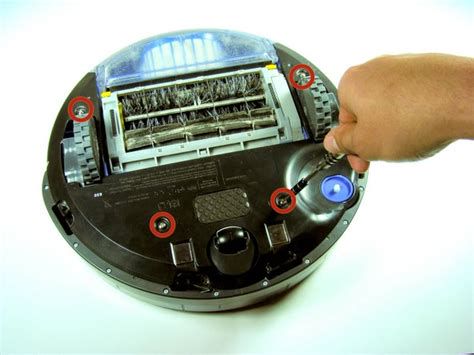
- Remove the bottom cover screws
- Remove the bottom cover
- Remove the side brush drive screws
- Remove side brush drive
- Remove the tri-wing screw
- Carefully pry open the case
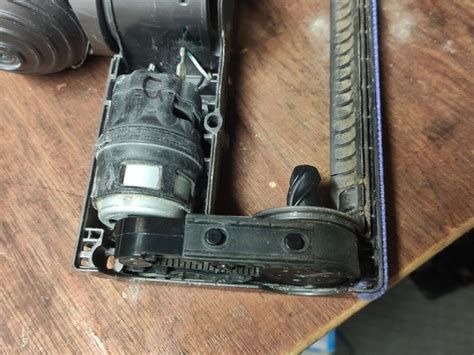
Checking Gears and Motor
Look for hair or other debris inside the gearcase, it will often be wrapped around the gear shafts. If you find it remove it, and go to the next step. Inspect the bearing for the gear that drives the brush (the one furthest away from the motor). The hole in the lower plastic case which acts as the bearing can be damaged, and the brush will not turn correctly. If it's worn it's time to replace the whole module. If it's ok, keep going.
Inspect the gear teeth on the small gear on the top of the middle gear. These frequently break and will cause the brushes to not spin at all or to spin erratically. If the teeth are broken you can replace the drive. Alternatively, and likely more cheaply, you can find replacement gears on eBay. If all gears are in good condition, lubricate them with white lithium grease.
| Component | Potential Issue | Solution |
|---|---|---|
| Side Brush | Hair/Debris Tangle | Manual cleaning |
| Gear Teeth | Broken or worn | Replace gears or module |
| Motor | Burned out | Replace motor or module |
If you have gotten to this point, you have checked your geartrain, it's fine, and you just need to replace the motor. Sadly, the bare motors are more difficult to find than the whole module. They are available on eBay but they may be well down the page and go in and out of stock.